
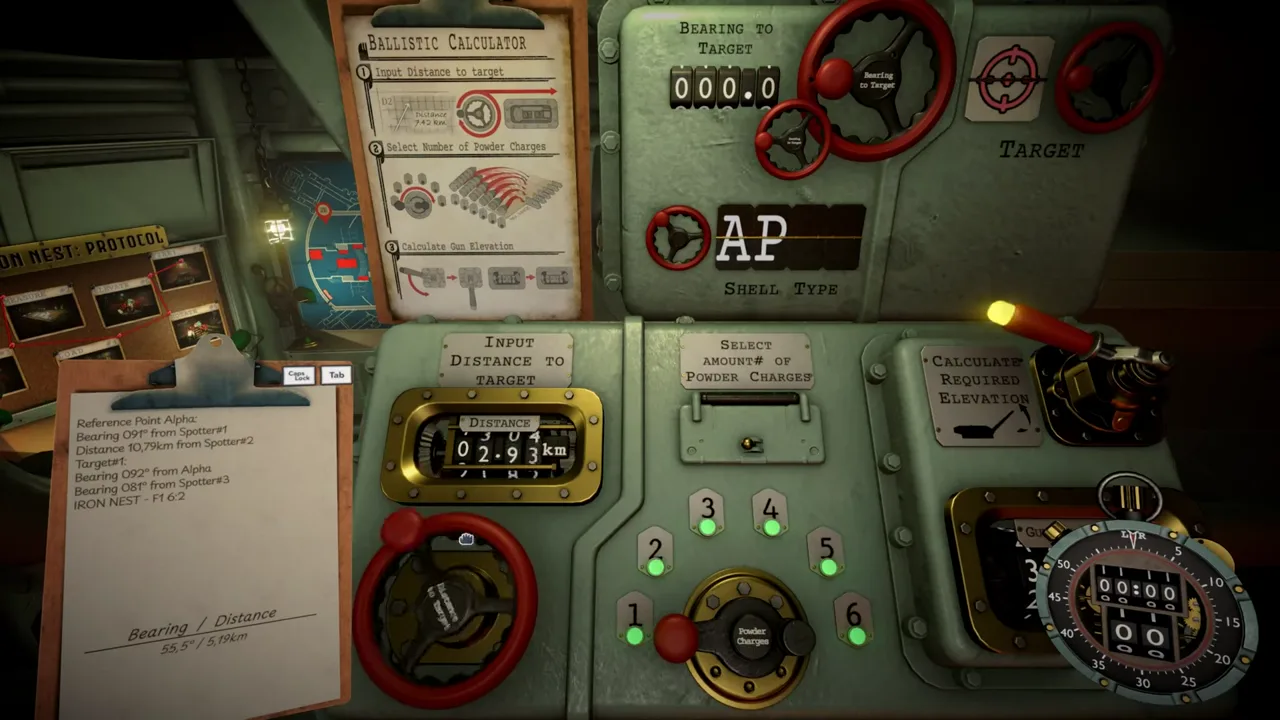
The Iron Nest calculator is the fire-control machine that turns a measured target range and your loaded powder charges into the one number the gun needs: elevation. You draw the final red line from your current Iron Nest position to the target, read its range and bearing, enter the range together with the actual powder-charge count, apply the resulting elevation to the gun, and apply the bearing to turret rotation.
Two things sit outside the machine’s job. Bearing is read alongside range but travels its own path to the turret, and the calculator never decides your target, your shell type, or a safe effect radius. It answers one question only: with this charge load at this range, how high does the barrel go.
What the Calculator Takes as Input
The machine’s inputs are deliberately few. The first is target range, measured from the red line you draw between your position and the target on the map. If you are still getting comfortable with that measurement, our guide on how to calculate distance walks through it, and how to calculate bearing covers the companion value.
The second input is the powder-charge count you actually intend to load. This is not a suggestion field. The number of loaded charges must match the number used in the calculation, because charge count sets the maximum reach of the shot and therefore the elevation the machine returns.
Bearing is measured at the same time as range, but it is not really a calculator input. It goes straight to turret rotation as its own setting. Keep the two values together in your notes, but think of them as two separate dials on the gun.
Finally, note what is missing from the list: ammunition. Whether you load an HE shell or an AP shell is your call based on the target, not something the machine weighs in on. Our shell types page covers that choice.
Reading Charges, Range Brackets, and Elevation
Powder charges work in range brackets. One charge reaches up to 5 km, two charges up to 10 km, and so on in 5 km steps, and you can load up to six charges. Pick the smallest bracket that contains your measured range: a target at 7.98 km sits between 5 and 10 km, so it takes two charges; a target at 18.59 km falls in the 15 to 20 km bracket, so it takes four.
Elevation has a hard ceiling of 60. The machine’s answer is always a number between zero and that cap, which is what makes the manual math later on so clean. Even firing from one end of the map to the other, a distance of 22.24 km, stays inside the system at five charges.
The output itself is a single elevation figure. Once you have it, the solution is complete: range and charges produced elevation, the red line produced bearing, and the gun needs exactly those two settings plus the matching shell and charge load.
Transferring the Solution to the Gun
The correct sequence, as established by the community, runs in a fixed order:
- Draw the final red line from the current Iron Nest position to the target.
- Read its range and bearing.
- Enter the range and the actual powder-charge count into the calculator.
- Apply the resulting elevation to the gun.
- Apply the bearing to turret rotation.
- Confirm the loaded charges match the calculation, then fire.
Treat every input as load-bearing. If you re-plot the target, change the charge count, or swap shells after getting an elevation, the old number is dead and the solution must be run again. A worked example from community play: range 7.98 km, bearing 74.8, two charges loaded, elevation set to 47.88, one HE shell, direct hit.
When the Calculator Goes Offline
At a certain point in the campaign the game takes the machine away. On the Gorge mission, your calculation machine is offline and the rangefinder is disabled, so every solution has to be produced by hand. The math behind it is simple enough that players report being fully accurate without the machine.
The equation is a straight proportion: distance to the target over your maximum distance equals gun elevation over 60, since 60 is the highest the elevation can go. Rearranged, elevation = distance × 60 ÷ maximum distance, where the maximum distance is the top of your charge bracket.
Two worked examples from the manual-method demonstration. At 7.98 km with two charges, the maximum distance is 10 km, so 7.98 × 60 ÷ 10 gives 47.88 degrees; with bearing set to 74.8, the shot lands on target. At 18.59 km with four charges, the maximum is 20 km, so 18.59 × 60 ÷ 20 gives 55.77 degrees; with bearing 82.1, that shot lands too.
Community reverse engineering produced the same relationship in a shorter form: Elevation = Range (km) × 12 ÷ Charges. At 7.61 km with three charges it returns roughly 30.44 degrees. The two formulas agree because each charge adds 5 km of maximum range, and 60 divided by 5 is 12. Be aware this models the game’s simplified ballistics rather than real artillery physics, and it should be sampled against the current in-game calculator after patches in case the numbers move.
Community Calculator Tools
Two unofficial browser tools circulate in the community for players who want a second machine. The first, built by byrod, asks for a target range and returns elevation and charge information, with a firing log that can pin multiple targets at once. Its description lists offline use, mobile layouts, English and French language support, and pasted target data extracted with Windows Snipping Tool OCR.
The second, the UNOFFICIAL Iron Nest FCC by joeoakley52, accepts bearing, distance, and charges, returns elevation, and keeps its own firing log. Its thread pitches it for exactly the situation above: when the in-game ballistic calculator is damaged, or when several targets must be prepared in advance.
Both are fan-made and unofficial, so treat their outputs as community reconstructions and verify against the in-game machine when it is available. And the same limit applies to them as to the real thing: an external calculator does not decide the target, the shell type, or the safe effect radius. That judgment stays with the gunner.
Frequently asked questions
What does the Iron Nest calculator do?
It converts the target range and the number of loaded powder charges into the gun elevation for a shot. Bearing is handled separately and applied to turret rotation.
How do you shoot when the calculator is offline?
On the Gorge mission the calculation machine is disabled, so players compute elevation manually: elevation equals distance times 60 divided by the maximum range of the loaded charges.
Are the online Iron Nest calculator tools official?
No. The browser tools shared in the community are unofficial fan projects, and the community notes they do not choose your target, shell type, or safe effect radius.